Showing posts with label iphone app. Show all posts

Friday, February 4, 2011

Celebrate Black History Month !

If you aren't on our NML monthly update, you're missing out on great monthly offers (for some Free Stuff!)

Sign up for the Email Newsletter Here!


February is Black History Month--a time dedicated to honoring Black Americans and their contributions throughout history.

From a musical standpoint, Jazz is one of the greatest gifts that Black American musicians have given the world. In all its forms from big band to solo improv, from traditional to experimental, from formal to funky, Jazz has altered the musical landscape beyond recognition.

In honor of Black History Month Naxos is offering a three-month free trial of Naxos Music Library Jazz for your students. That's an extra two months of free streaming jazz from labels like Fantasy Records, Naxos Jazz, Jazzwerkstatt, and Innova! E-mail us now to start your trial.


Featured Jazz Labels

NML Jazz offers thousands of recordings from over 50 labels. In addition to enjoying the NMLJazz on your computer, it's got a fully functioning iPhone App! Check the App store to download and enjoy Jazz greats on the go!

We proudly feature the Fantasy Jazz collection--a monumental jazz catalog with over 23,000 tracks from nearly 500 renowned artists.


In addition the classics on Fantasy, you can find traditional, contemporary, experimental, and more on other labels like these.


Have a Jazzy Weekend!
Nick

Nick D'Angiolillo
615.465.3836
MusicLibrary@NaxosUSA.com


Join in the conversation!



Monday, December 6, 2010

NML iPhone App Tutorial

Here's a step-by-step guide to setting up the Naxos Music Library iPhone App.


If you have questions or concerns, please e-mail me for assistance at nmlhelp@naxosusa.com.


Pro musica,
Mo

Monday, November 8, 2010

App News!

Hey there NMLers!

It is a new week and I have here, flowing through my fingers especially for you, a quick update with some excellent news.
App news, to be specific.


NML iPhone App:
Our app for iPhone, iPad, and iPod has been getting a lot of use since its release last year. We worked out the bugs and upped the pretty factor for version 2.0.
But now we're getting ready for some more updates!
3.0 is currently in testing. The biggest new feature is multitasking so you can keep working/playing/looking at pictures of kittens while your music plays!


NML Droid App
The developers are almost done with the long-promised app for Android! It's also in the final testing stages. If all goes according to plan, we hope to have this app out around December 1!
Get excited, iPhone mutineers!
(No screen shots yet, but we promise to put some up once the date gets closer.)


As always, please call or write if we can answer any questions about the apps-- current standing or coming updates--or the NML. We're always here to help!


Pro musica,
Mo
nmlhelp@naxosusa.com

Thursday, September 2, 2010

Calling All App Users!

So you have downloaded an app for the NML, NMLJ or NSWL.

That's great…unless you can’t use it.

What I have heard from a lot of librarians and professors lately is that they need an easy step-by-step guide to setting the app up for first time use. Here by popular demand is just such a guide!

Creating a Personal/Student Playlist for Naxos Apps

The iPhone app was designed with our institutional users in mind, so a subscription through a university, library, school, or orchestra works. It just works little differently on an iPhone than on a computer.

For one thing, it does NOT require any work with IP authentication or the university's proxy server.

To generate a login for the NML app, you should:

1. Visit the NML page for your institution (library, university, school, orchestra, etc.) from a computer by going through the institution’s unique URL: http://example.naxosmusiclibrary.com

2. Navigate to the Playlist area and click “Sign Up” in the "Personal/Student" playlist account area.

3. Create a login on the sign up page. This login, consisting of your email address and a custom password, then becomes your login for the app.

See the tutorial below if you need help creating a personal/student playlist account.


Once you are fully signed up you will have access to the institution’s playlists and you can create your own customized playlists as well. I recommend creating a playlist on a computer before attempting to access through the app. For some reason it seems to make your first access run more smoothly.

You can also use the app to search and browse the full NML anytime, anywhere! That means you can stream music anytime, anywhere!

Happy Mobile Browsing, Music Lovers!


Pro musica,
Mo

nmlhelp@naxosusa.com


Librarians: Please feel free to share or link this on your library’s website, as well as share or embed the YouTube tutorial to help your patrons use the NML more effectively.

Wednesday, May 12, 2010

600,00 Tracks and Climbing!

What a great week this has been for the NOL Team!

Not only did we launch the Naxos Spoken Word Library App and welcome our 2,000th Twitter follower, but we also hit that wonderful 600,000 track marker!

To celebrate this milestone we've decided to spotlight a feature of the NML that will help you keep up with all of those additions!

The NML RSS Feed

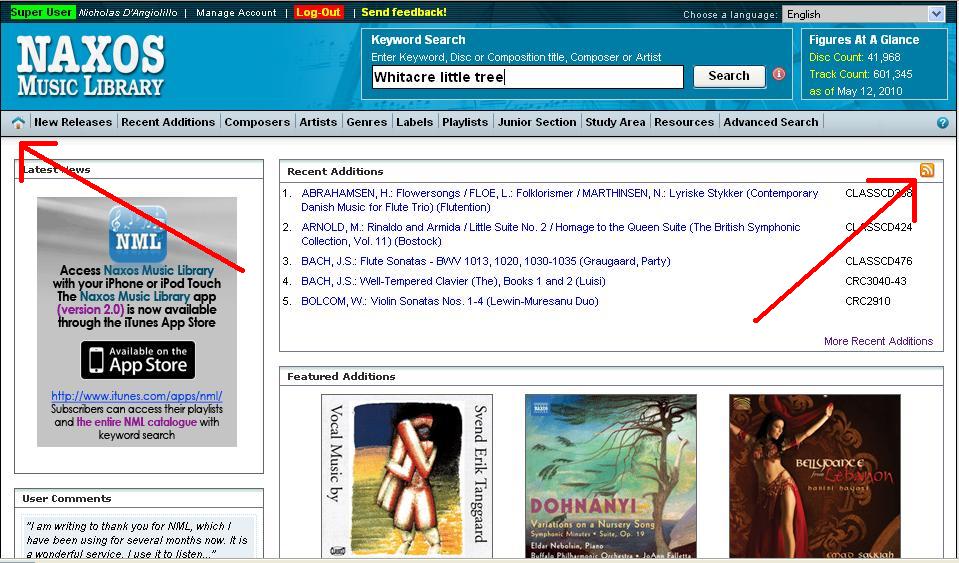
Below you can find a step by step (and picture by picture) guide to using the RSS Feed available with the NML.

Adding as many albums per day as we do (sometimes, it's over 100 albums per day!) it can be tough to keep track of just how many new additions there are. The RSS feed includes every album added to the NML. For those who don't use RSS feed's currently, the page can feel a bit daunting...don't fret!

Thanks to the folks at www.feedicons.com for providing the icon to the left! Visit their site to download all shapes, colors, and resolutions of the RSS icon!


First, visit the "Home" screen in the NML. Simply click on the little house (see below). Then, click on the RSS Icon


In a separate tab, the window below will open. If you use an RSS manager, you'll know what to do here. You can also use the new version of Outlook to manage your feeds, and that's what I'll be showing below.

Next, Outlook will prompt you to "allow" the feed.

And voila! Every album added to the NML will now be available for you to quickly, and easily browse. I'll leave it to you to figure out how to use this information, but now you know how to get it!

Thanks to both our Label partners and all of you - our subscribers. It's time to start the countdown (or count up?) to 1,000,000 tracks!

Happy RSS'ing,
Nick


Nick D'Angiolillo
615.465.3836
Nick@NaxosUSA.com
Join in the conversation!



Friday, February 26, 2010

*Live* - NML iPhone App - Version 2.0

I'm such a geek for updates. Really. I am guilty of hitting that "Refresh" button on just about every page, hoping for something new. The good news, is that we actually have a VERY cool update to share with everyone!

The NML iPhone App has been so well received (and we THANK YOU!!!), that we couldn't just stop there. There was so much more that could be done! Well, see below for some great screenshots of the new NML iPhone App 2.0.

** Version 2.0 is now Live! Visit the App Store, or click the link below to update your version!**

That shouldn't stop us from updating you though? Right? :) If you don't have the current NML iPhone app, click the link below to download it now!


Version 2.0 of the app will still allow you to view your custom, individual playlists, as well as the professor/administrator created ones. Those menu's received a slight "Texture" update. I'm a fan of the new buttons!


Not sure about what to listen to? Soon , there will be some "Naxos" created playlists too! These will also start to appear on the "Web-Based" NML pages too, so keep your eyes peeled!

Who knows, we may even hold contests for our readers to submit playlists! Thinks like composer or period specific playlists are always great!

If you're following us on Twitter or Facebook, you may have seen my love for Steve Reich. Ever since my Musicology research paper in college, I've had a soft spot in my musical heart for his music. Hence my 4 differnet Steve Reich compilation playlists.

The same goes for my hopeful inclusion of a "Marimba" playlist. (being a percussionist)

Quick! How many drummers does it take to screw in a lightbulb?
Answer: Five. One to screw the bulb in, and four to talk about how much better Neil Peart could have done it.

Har Har Har - now back to the Updates!

Thanks to DrumJokes.com for the Friday Funny.

---------
The next "button" on our stop, is the Catalog button. This menu brings up a simple search bar. Essentially, it performs a keyword search within the Naxos Music Library and displays the results on your iPhone/iPod Touch!


Searching for "Brahms" brings up this window ----------------->


The next window brings up a track listing, as well as the album description. See below for another side-by-side set of screenshots.


<------- This appears at the Top of an Album Page

This appears at the bottom of a Album's Page -------->
(simply scroll down to the bottom of the track listing)


The player window remains unchanged, except for the fact that you can now hit the "Back" button, navigate to a new piece, scroll, browse..etc... all while the music plays!
If you couldn't tell, we're really excited about this new version! If you have any questions, need help creating playlists, or simply want to chat, feel free to call or write anytime!

Happy Updates!
Nick

Nick D'Angiolillo
615.465.3836
Nick@NaxosUSA.com

Tuesday, December 29, 2009

NML Jazz iPhone App!


Isn't this a nice little "end of the year" gift!

The Naxos Music Library Jazz has its own iPhone App! The function and form mirrors the NML App. It also, allows access to your NML Jazz individual and account based playlists remotely!


In case you're a bit rusty about how to install an App, here's a link to the NML App installation and set up guide.

Should you have any questions, please don't hesitate to call or write!

Happy New Year!
Nick

Nick@NaxosUSA.com
615.465.3836