Friday, July 30, 2010

New Feature: Search Composer by Work!

The NML has always allowed you to search for music by composer and artist. But now we have a great feature that lets you search a composer’s NML recordings by work rather than album!

Curious how many recordings of Beethoven’s 5th we’ve got? Browse over to Ludwig himself and have a look!

Need to see if we’ve got a recording of an abstract percussion and harp piece? Now you can, quickly and easily!


In light of the developments, here’s an easy step-by-step guide to searching a composer’s recordings by work. I'm going to use Ravel's Sheherazade as an example.


Getting Started


Once you click on the “Composers” tab you will automatically be dropped onto the list of composers whose last names begin with A.


From that screen you will simply select the letter of the composer’s last name under “Available Filters.”


Scroll down to find the appropriate composer and click on your chosen composer. This will take you to the composer’s page with a short bio and a rundown of the media in which that person composed—here called “category.”


Dual Search Tabs

Below the bio you will see two tabs: View by Album and View by Work.

View by work is now the default tab, but you can view by album if you choose to.

Here we see an alphabetical listing of the composer’s works with genre/category as well as other information. You can scroll through the list and click on the work to pull up a page with work details and information and a list of recordings on which this work appears.

Search by Category


You can also narrow your search by choosing to view only certain categories of the works. Click on the pull-down menu that reads “All Categories” and select your chosen category. This will take you to a page comprised solely of the composer’s works in that category.


Then you can easily select your chosen recording in the usual manner!


So there you go!

This wonderful new feature should help you find recordings more accurately in a shorter period of time. Efficiency leads to more music, friends.

And more music is always a good thing.


Pro musica,

Mo


NMLHelp@naxosusa.com


Join in the conversation!



Wednesday, July 21, 2010

Naxos Music Library on YouTube!

Greetings Music Lovers!

By now I hope you all have seen the Naxos Online Libraries YouTube channel. Although only a few months old, there are 6 videos up with more on the way.
Share these videos on Twitter, Facebook, on blogs, websites, or however you'd like!

What tutorials would you like to see added to our list?


Musically~

Anne

Wednesday, June 9, 2010

User Inspired Development - Usage Statistics Reporting

Hi All,

We've got some pretty awesome (and big) news for you all! Our next NML design and development feature was 100% inspired by your feedback. Thanks for all of the help, support, and suggestions over the past few months!

You wanted better Usage Statistics.
You're 'gettin 'em!

Soon, the Naxos Online Library usage statistics windows will offer some great new features. We've taken some screenshots below of the new features. Be sure to comment below, email, or stop by our booths at the League of American Orchestras conference and ALA Annual Meetings later this month with all of your ideas and suggestions!

** As always, the development information and screenshots are taken from our test servers. Information, presentation, features, and everything else can (and most likely will) change from what's posted below. We're simply excited to give you a sneak peek!**

---------------------
  • Standard View Updated!
Nothing will change as far as "how" you access your usage stats. You'll still log in with your Administrator or Librarian account. However, now, the stats will load on the main NML page! No more crazy pop-ups!


There are a few things to note on this screen. First, all of the relevant data is available for a "6 month" snapshot by default.

  • Export to Excel!
Now, you'll be able to export whatever window you're viewing directly to an excel spreadsheet! You can export any of the windows we'll show below, so go crazy! Here's a screenshot of what the excel export looks like.


  • Top 20!
Want to see what you're users are listening to? Curious about what's most popular in your subscription? With the "Top 20" view, you'll be able to see what's most popular.

Our Orchestra friends will be able to see what type of music interests their subscrbers. Imagine knowing exactly what to program for next year!

  • Daily and Hourly Breakdowns!
Want even MORE information? Not a problem! Just like before, you can break stats down by day. Check daily usage, track information, and much more. A new "Hourly" stats feature has also been added.

Here are a few screenshots that show the process from top to bottom. The Red arrows show the "click" progression down the page.


Once you expand the window to the Hourly view, you're able to export THAT to Excel too!


We hope you enjoy these little previews of things to come. I know I LOVE showing off so many of the cool development features. The changes could go live as early as next week (6.16.10), but no promises!

Have questions or comments? Feel free to re-post this blog, write, or call anytime!

Happy Statistical Analysis,
Nick


Nick D'Angiolillo
615.465.3836
Nick@NaxosUSA.com


Join in the conversation!

Friday, June 4, 2010

Free Music at ALA2010


In just a few weeks Naxos will be convening with librarians from across the country at the ALA conference in Washington D.C. It will be my first library conference, so I am looking forward to meeting many of you in person! As you may have heard on our Twitter feed or in our newsletter, we will have a Foursquare competition at the ALA2010 conference! Visit the Naxos booth (#2544) and check-in on Foursquare to receive a Free gift bag with CDs from Naxos until they're gone!


Stop by, check in, get Free Music!

And say hello to your friendly, neighborhood Naxos representatives, Anne and Nick :)
Happy Friday!
Anne


Join in the conversation!

Friday, May 28, 2010

Blue is the new grey!


Hi Friends,

Happy Friday! Below is a screenshot I saw this morning, and I just had to share. On our test servers, the NML's player window is blue!

Do you like the blue? If you could choose a color for the window, what would it be? Would you like to be able to change the color of the Player Window on the fly- or is it "All about the music, who cares about colors!"?

Leave your answer in the comment for a chance to win an NML "Prize Pack" complete with some fun items, as well as some CD's!


As always, feel free to call or write anytime.

- Nick

Nick D'Angiolillo
615.465.3836
Nick@NaxosUSA.com


Join in the conversation!

Wednesday, May 12, 2010

600,00 Tracks and Climbing!

What a great week this has been for the NOL Team!

Not only did we launch the Naxos Spoken Word Library App and welcome our 2,000th Twitter follower, but we also hit that wonderful 600,000 track marker!

To celebrate this milestone we've decided to spotlight a feature of the NML that will help you keep up with all of those additions!

The NML RSS Feed

Below you can find a step by step (and picture by picture) guide to using the RSS Feed available with the NML.

Adding as many albums per day as we do (sometimes, it's over 100 albums per day!) it can be tough to keep track of just how many new additions there are. The RSS feed includes every album added to the NML. For those who don't use RSS feed's currently, the page can feel a bit daunting...don't fret!

Thanks to the folks at www.feedicons.com for providing the icon to the left! Visit their site to download all shapes, colors, and resolutions of the RSS icon!


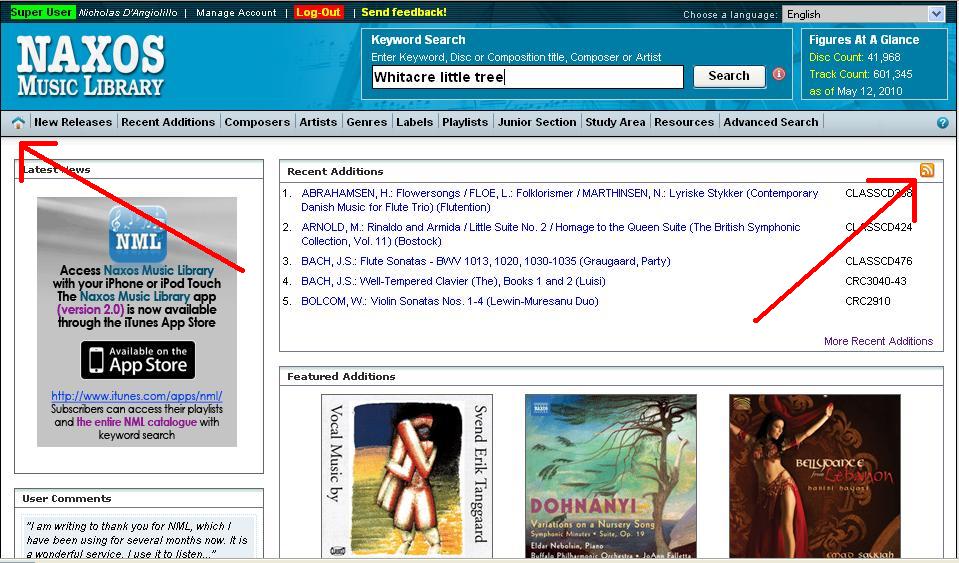
First, visit the "Home" screen in the NML. Simply click on the little house (see below). Then, click on the RSS Icon


In a separate tab, the window below will open. If you use an RSS manager, you'll know what to do here. You can also use the new version of Outlook to manage your feeds, and that's what I'll be showing below.

Next, Outlook will prompt you to "allow" the feed.

And voila! Every album added to the NML will now be available for you to quickly, and easily browse. I'll leave it to you to figure out how to use this information, but now you know how to get it!

Thanks to both our Label partners and all of you - our subscribers. It's time to start the countdown (or count up?) to 1,000,000 tracks!

Happy RSS'ing,
Nick


Nick D'Angiolillo
615.465.3836
Nick@NaxosUSA.com
Join in the conversation!


Tuesday, April 13, 2010

NSWL iPhone App! - Updated

The third App from Naxos is now complete. Soon, audiobooks and musical texts will be even easier to access on the go with the Naxos Spoken Word Library App!

The NSWL allows for streaming of the Naxos Audio Books label, a wonderful new Bookmarking feature (see below for a great new App feature), and access to more than 500 titles!

Below are some screen shots from the iPod/iPhone/iPad App. This week, Nick will also be at the AISL annual conference (here in Nashvegas!), and he'll have the Beta version of the App for all to see and "play with"!

*As always, these shots were taken from a Beta version of the App. Things can, and most likely will, change between now and the release of the App on the App store. *


<---- Search Page


Album Page ---->


The ability to add and delete bookmarks on the go is a GREAT new feature of the NSWL app! Simply click on the + to start the process. These bookmarks are then available both on the App, and on the computer!


<---Add a Bookmark


Delete a
Bookmark --->


- Nick

Nick D'Angiolillo
615.465.3836
Nick@NaxosUSA.com

Follow us on Twitter!
Friend us on Facebook!

Thursday, April 8, 2010

Video Tutorials!

Hey there, subscribers,

Naxos Music Library has started creating video tutorials! We've posted our first two videos on the newly-created Naxos Online Libraries channel. Soon there will be short video tutorials answering all "how-to" questions for Naxos Online Libraries-- both online and on YouTube. If you have specific questions you'd like answered in a video tutorial, let us know. All suggestions are welcome!

Creating a Student Playlist Account


AND


Building (and editing) Playlists in the Naxos Music Library


Cheers!

Anne

Anne Benson
Naxos of America, Inc.
615-465-3833
abenson@naxosusa.com

Monday, March 22, 2010

NML App Update (V2.1)

Hi Friends,

As busy as we have been with our travels, we've launched an update for the NML iPhone app.

Click on "Updates" to download and install the NML update!

Some of our users have expereinced a weird bug, that was preventing them from connecting to a Wireless network. Installing the update (to Version 2.1) should solve the problem. If it doesn't below is a step by step guide to troubleshooting the device.

1. Tap on "Listen For Free"

2. Tap on "More"


3. Tap on Support


4. Tap on Send! This will send all of the appropriate diagnostic information to our Customer Service and Development team. If you have trouble sending email messages from the app, you can copy and paste the body of text into a regular email message to "Customer.Service@Naxos.com".


If you have any questions, feel free to call or write anytime!

See you in Portland for PLA! Stop by booth #636 and take a look at the NVL, and the new iPhone App!

- Nick

Nick D'Angiolillo
615.465.3836
Nick@NaxosUSA.com

Follow us on Twitter!
Friend us on Facebook!

Thursday, March 11, 2010

NVL Usage Stats

Hi Folks,

A short, sweet, and relatively self explanatory post today. The Naxos Video Library now has live usage statistics availbe for viewing and manipulation. A few screen shots appear below.

As with all of the Naxos databases, you've got to log in with your "Administrator" username and password. If you're unsure about your account login details, feel free to call or write!

There's also a new "Manage Account" window as well. See below for screenshots of that window too.

If you aren't an NVL subscriber or haven't already trialed the NVL, now's a great time. NML subscribers need only "say the word"!

Enjoy!


NVL Usage Stats Window
One of my favorite "stats" feature, is the ability to group the stats by video. Should a professor create a playlist with 15 clips from the same opera, you can now group them together! Figure (b) shows the same group of stats, "grouped by video".


Figure (b) "Grouped by Video" stats


NVL Manage Account Window


Cheers!
Nick

Nick D'Angiolillo
615.465.3836
Nick@NaxosUSA.com

Follow us on Twitter!
Friend us on Facebook!