Not only did we launch the Naxos Spoken Word Library App and welcome our 2,000th Twitter follower, but we also hit that wonderful 600,000 track marker!
To celebrate this milestone we've decided to spotlight a feature of the NML that will help you keep up with all of those additions!
The NML RSS Feed
Thanks to both our Label partners and all of you - our subscribers. It's time to start the countdown (or count up?) to 1,000,000 tracks!Below you can find a step by step (and picture by picture) guide to using the RSS Feed available with the NML.
Adding as many albums per day as we do (sometimes, it's over 100 albums per day!) it can be tough to keep track of just how many new additions there are. The RSS feed includes every album added to the NML. For those who don't use RSS feed's currently, the page can feel a bit daunting...don't fret!
T hanks to the folks at www.feedicons.com for providing the icon to the left! Visit their site to download all shapes, colors, and resolutions of the RSS icon!
First, visit the "Home" screen in the NML. Simply click on the little house (see below). Then, click on the RSS Icon
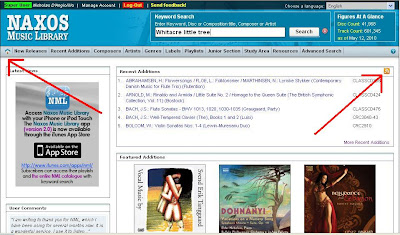
In a separate tab, the window below will open. If you use an RSS manager, you'll know what to do here. You can also use the new version of Outlook to manage your feeds, and that's what I'll be showing below.
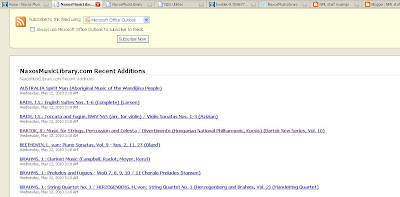 Next, Outlook will prompt you to "allow" the feed.
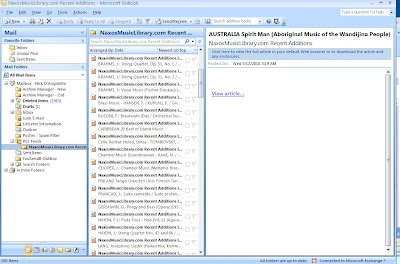
 And voila! Every album added to the NML will now be available for you to quickly, and easily browse. I'll leave it to you to figure out how to use this information, but now you know how to get it!
Adding as many albums per day as we do (sometimes, it's over 100 albums per day!) it can be tough to keep track of just how many new additions there are. The RSS feed includes every album added to the NML. For those who don't use RSS feed's currently, the page can feel a bit daunting...don't fret!
T
 hanks to the folks at www.feedicons.com for providing the icon to the left! Visit their site to download all shapes, colors, and resolutions of the RSS icon!
First, visit the "Home" screen in the NML. Simply click on the little house (see below). Then, click on the RSS Icon
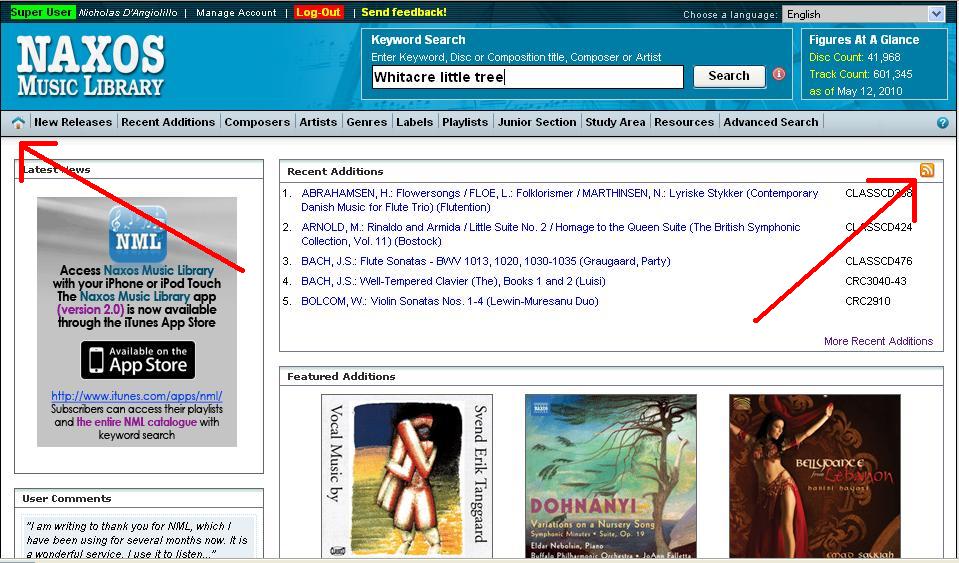
In a separate tab, the window below will open. If you use an RSS manager, you'll know what to do here. You can also use the new version of Outlook to manage your feeds, and that's what I'll be showing below.
 Next, Outlook will prompt you to "allow" the feed.
 And voila! Every album added to the NML will now be available for you to quickly, and easily browse. I'll leave it to you to figure out how to use this information, but now you know how to get it!
Happy RSS'ing,
Nick
Nick D'Angiolillo
615.465.3836
Nick@NaxosUSA.com
Join in the conversation!