Showing posts with label streaming audio. Show all posts

Thursday, February 4, 2010

Naxos Spoken Word Library Writeup

Hello Friends,

Our colleague across the pond Nicolas Soams has written a fabulous article about the Naxos Spoken Word Library!

Nicolas works with our wonderful collection of Naxos Audio Books - and has some great things to say about all of the new changes and features of the NSWL.

The bookmarking ability is especially exciting! Head on over to the NAB Blog, and have a read!

As they say in England - Cheers!
Nick

Nick@NaxosUSA.com


Tuesday, December 29, 2009

NML Jazz iPhone App!


Isn't this a nice little "end of the year" gift!

The Naxos Music Library Jazz has its own iPhone App! The function and form mirrors the NML App. It also, allows access to your NML Jazz individual and account based playlists remotely!


In case you're a bit rusty about how to install an App, here's a link to the NML App installation and set up guide.

Should you have any questions, please don't hesitate to call or write!

Happy New Year!
Nick

Nick@NaxosUSA.com
615.465.3836

Tuesday, November 24, 2009

Easily Download Music You Enjoy!


Upon logging into the NML today, many of you notice the "Buy and Download" buttons in the NML. These links will take you to our Download store, Classics Online!

While many users welcome this feature, (as even some of the more well known recordings can be tough to find for purchase), some folks epxressed interest in the ability to turn this feature off.

Here's a step by step guide to turning the links off, should your institution like to.

Here's a Screenshot with the Link on.

1. To Begin: Log into the NML with your administrator Username//Password


2. Click on "Manage Account"


3. The next pop-up will display the account management screen. You can see the "Enable/Disable" option for the COL Links.


That will do it! If you have any other questions, feel free to contact us at Naxos.

Happy Thanksgiving!
Nick

615.465.3836 (direct)
Nick@NaxosUSA.com


Thursday, November 19, 2009

NML at AMS

The American Musicological Society recently held their annual meeting in Philadelpia, PA.

I had a great time, and got some great feedback! We appreciate all of the folks who came by and talked about everything from the new iPhone App, to the Naxos Video Library (Look for a post shortly with some great new Developments and Screenshots), to the AWESOME Virtual Haydn.

Here's a clip of the Virtual Haydn we had on display!

(e) - I'm still learning how to format the Aspect Ratio of embedded clips! Please bear with me!


Overall the show was great, and it was nice to see everyone!

Are there other shows/meetings/conventions you'd like to see the NML team at? If so, post below in the comments section, and we'll be sure to try our best to attend!

Here are some pictures from the trip!

NML Booth at the AMS Meeting


Hello from the Curtis Institute of Music! What a GREAT Music Library they have!


Ah, the city life!

Where would you like to see the NML team?

-Nick
615.465.3836
Nick@NaxosUSA.com

Wednesday, November 11, 2009

Naxos Music Library iPhone App is Live!

Hi All,

The Naxos Music Library iPhone App is now Live! You are now able to listen to your personal and account created playlists on the iPhone and iPod Touch!

For more information on the "Nuts & Bolts" of how the app works, see this post.

Search the iTunes App Store for "Naxos Music Library" to download the Free App, or follow this link!

What a thrilling day for the world of classical music!

----------
Here's a step by step walk-through from finding the app, to synching your device!

1. Enter "Naxos Music Library" ("Naxos" works too) in the iTunes store Search box.


2. Click on "Get App"


3. Enter your Apple ID, or create a new account. Download the App.


4. Once the App has been downloaded, ensure it's in queue to be synched up. I've taken a shot below of everything "as it should be". If you've installed an App from the iTunes store before, it's exactly the same as every App!


---------
Once the App is Installed, it's time to make sure you have some playlists!

1. Visit the NML. If you are an student or member of an institution, you can visit your institutions unique webpage. Ask your Librarian, Account Administrator, or us here at Naxos if you have questions!


2. Any playlist in your personal folder, or account folder will be available. Below is a shot from a University account. Individual subscribers won't need to adjust anything, or log in a second time, to create playlists!


3. Oh, and lest we forget: The iPhone App, synchs both your Naxos Music Library, and Naxos Music Library Jazz playlists! Here's a screenshot of my iPod Touch. The playlist "Allison Wedding " (a very cool Jazz singer) , is an NMLJazz Playlist, while "Bernstien Mass" is an NML palylist.


We'd like to also take a moment and give a very big "Thanks" to our developers!

From all of us at Naxos, Happy Remote Listening!
Nick
615.482.5249
Nick@NaxosUSA.com

Tuesday, November 10, 2009

NML e-Card; Naxos at AMS 2009!

Hi Folks!

Below is an interactive e-card which you can share, and embed everywhere! The App is in the final stages of approval, and we'll be sure to let everyone know when it's ready to download from the App store!

NML iPhone e-Card! Share me!

- On the e-card page, there are embed links and different embed codes for every social media outlet available!

I've also added the latest question to the Q+A post below!

Q: Who can use the App?

A: All subscribers will be able to make use of the App; Institutions, Orchestras, and individual subscribers! Students at institutions will be able to listen to their personal playlists, as well as those created by the professors and account administrators.

If you require assistance with the "Student Playlist" functionality, please feel free to write! My e-mail address is below!


Also, if you or anyone from your institution, is attending the AMS conference in Philadelphia this weekend, be sure to stop by and say "Hi!" I'll have my iPhone on hand for you to play with!

Happy Listening,
Nick
615.482.5249
Nick@NaxosUSA.com

Wednesday, October 28, 2009

Q+A with the NML staff!

*** Updated***
The App is Now Live! Check Here for all the information!

----------------
Today we posted for questions via our twitter feed, and through our subscriber network!

Here are some of the most asked!

Q: What will the App do?
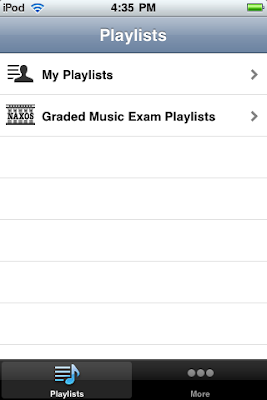
A: The NML iPhone and iPod touch application will allow remote access to your personal and account playlists. Below are some screenshots of the NML Playlist window, and a direct comparison to the NML iPhone App window.

The playlist tabs in the NML, make up the initial iPhone App window. Folders follow suit, and third come the actual playlists. The progression from the log-in window on the App to listening to a selection, should feel completely natural!


Q: Who can use the App?

A: All subscribers will be able to make use of the App; Institutions, Orchestras, and individual subscribers! Students at institutions will be able to listen to their personal playlists, as well as those created by the professors and account administrators.

If you require assistance with the "Student Playlist" functionality, please feel free to write! My e-mail address is below!

Q: What does the App's button look like?

A: Look below! You can see my iPod's Screenshot! Looks good yea?


Q: Will buffering be a problem on the iPhone?
* From Dan in Portland

A: Buffering will not be a problem! The Naxos Music Library has recently completed a "behind the scenes" transition to enhance the overall streaming experience. Streaming on both the NML website and the iPhone App have been fully optimized and tested.

I've spent my time (Nick) using the iPod Touch through many wireless networks. Everywhere from our office, to my home internet, to (yes, quite the interesting location) the local Mall's food court. Happily, the NML worked everywhere, with no interruption in streaming.


Q: How much room will the app take up?
* From Kate in Georgia

A: I can only speak to the Beta App, as final file size may vary, but the NML Beta App clocks in at 540 KB. Remember, the final version will probably differ a little bit in file size.

Q: Do Playlists I create on the NML update in real time? How fast can I access newly created playlists?
* From Kim in Southern California

A: Updating playlists is simple!
1. Create a new playlist on the NML website.
* For help creating playlists, see our earlier post
here

2. Click the "Home" button on your iPhone. (It's the button on the bottom which takes you to the navigation window"


3. Log back into the NML iPhone Application.

4. Voila! The playlist should now appear in your list!


Q: How much will the App Cost?
* From "Concerned" in Connecticut

A: Absolutely nothing! The app will be available through the App store. We'll post links on the NML and Naxos' websites, and most likely here on our blog that link direct to the App when it's ready to go!

Q: I know nothing about iPhones. Am I going to be expected to troubleshoot my students' devices?
* From Alex in Missouri

A: Not in the least. Since the playlist window is authenticated by a Username and Password tied to a specific playlist, and not by IP address, Referring URL, Proxy Servers, or any combination of the three, there will be NO troubleshooting necessary of the "nuts and bolts" by account administrators.

What you may want to do, as account administrators, is to host a training session on creating personal playlists. If you need help, or would like Naxos to be a Webinar presenter for your staff or students, simply say the word!
We can host the entire presentation on our end!


That's it for today folks! Please feel free to re-post these questions and answers on your blog or web pages!

The NML team is also hosting special promotional pricing to commemorate the launch of the App. Give us a call or shoot an e-mail for all the details! You can also click on the link just below!

Click Here for Information on the iPhone App Promotion!


Happy Listening and Happy Halloween!
-Nick
615.465.3836
Nick@NaxosUSA.com