Showing posts with label iphone. Show all posts

Friday, February 26, 2010

*Live* - NML iPhone App - Version 2.0

I'm such a geek for updates. Really. I am guilty of hitting that "Refresh" button on just about every page, hoping for something new. The good news, is that we actually have a VERY cool update to share with everyone!

The NML iPhone App has been so well received (and we THANK YOU!!!), that we couldn't just stop there. There was so much more that could be done! Well, see below for some great screenshots of the new NML iPhone App 2.0.

** Version 2.0 is now Live! Visit the App Store, or click the link below to update your version!**

That shouldn't stop us from updating you though? Right? :) If you don't have the current NML iPhone app, click the link below to download it now!


Version 2.0 of the app will still allow you to view your custom, individual playlists, as well as the professor/administrator created ones. Those menu's received a slight "Texture" update. I'm a fan of the new buttons!


Not sure about what to listen to? Soon , there will be some "Naxos" created playlists too! These will also start to appear on the "Web-Based" NML pages too, so keep your eyes peeled!

Who knows, we may even hold contests for our readers to submit playlists! Thinks like composer or period specific playlists are always great!

If you're following us on Twitter or Facebook, you may have seen my love for Steve Reich. Ever since my Musicology research paper in college, I've had a soft spot in my musical heart for his music. Hence my 4 differnet Steve Reich compilation playlists.

The same goes for my hopeful inclusion of a "Marimba" playlist. (being a percussionist)

Quick! How many drummers does it take to screw in a lightbulb?
Answer: Five. One to screw the bulb in, and four to talk about how much better Neil Peart could have done it.

Har Har Har - now back to the Updates!

Thanks to DrumJokes.com for the Friday Funny.

---------
The next "button" on our stop, is the Catalog button. This menu brings up a simple search bar. Essentially, it performs a keyword search within the Naxos Music Library and displays the results on your iPhone/iPod Touch!


Searching for "Brahms" brings up this window ----------------->


The next window brings up a track listing, as well as the album description. See below for another side-by-side set of screenshots.
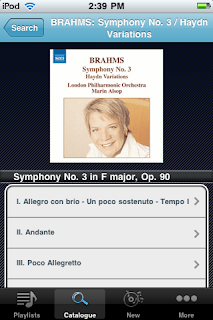
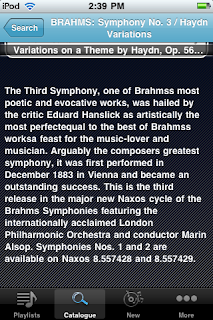
<------- This appears at the Top of an Album Page

This appears at the bottom of a Album's Page -------->
(simply scroll down to the bottom of the track listing)


The player window remains unchanged, except for the fact that you can now hit the "Back" button, navigate to a new piece, scroll, browse..etc... all while the music plays!
If you couldn't tell, we're really excited about this new version! If you have any questions, need help creating playlists, or simply want to chat, feel free to call or write anytime!

Happy Updates!
Nick

Nick D'Angiolillo
615.465.3836
Nick@NaxosUSA.com

Tuesday, December 29, 2009

NML Jazz iPhone App!


Isn't this a nice little "end of the year" gift!

The Naxos Music Library Jazz has its own iPhone App! The function and form mirrors the NML App. It also, allows access to your NML Jazz individual and account based playlists remotely!


In case you're a bit rusty about how to install an App, here's a link to the NML App installation and set up guide.

Should you have any questions, please don't hesitate to call or write!

Happy New Year!
Nick

Nick@NaxosUSA.com
615.465.3836

Wednesday, November 11, 2009

Naxos Music Library iPhone App is Live!

Hi All,

The Naxos Music Library iPhone App is now Live! You are now able to listen to your personal and account created playlists on the iPhone and iPod Touch!

For more information on the "Nuts & Bolts" of how the app works, see this post.

Search the iTunes App Store for "Naxos Music Library" to download the Free App, or follow this link!

What a thrilling day for the world of classical music!

----------
Here's a step by step walk-through from finding the app, to synching your device!

1. Enter "Naxos Music Library" ("Naxos" works too) in the iTunes store Search box.


2. Click on "Get App"


3. Enter your Apple ID, or create a new account. Download the App.


4. Once the App has been downloaded, ensure it's in queue to be synched up. I've taken a shot below of everything "as it should be". If you've installed an App from the iTunes store before, it's exactly the same as every App!


---------
Once the App is Installed, it's time to make sure you have some playlists!

1. Visit the NML. If you are an student or member of an institution, you can visit your institutions unique webpage. Ask your Librarian, Account Administrator, or us here at Naxos if you have questions!


2. Any playlist in your personal folder, or account folder will be available. Below is a shot from a University account. Individual subscribers won't need to adjust anything, or log in a second time, to create playlists!


3. Oh, and lest we forget: The iPhone App, synchs both your Naxos Music Library, and Naxos Music Library Jazz playlists! Here's a screenshot of my iPod Touch. The playlist "Allison Wedding " (a very cool Jazz singer) , is an NMLJazz Playlist, while "Bernstien Mass" is an NML palylist.


We'd like to also take a moment and give a very big "Thanks" to our developers!

From all of us at Naxos, Happy Remote Listening!
Nick
615.482.5249
Nick@NaxosUSA.com

Tuesday, November 10, 2009

NML e-Card; Naxos at AMS 2009!

Hi Folks!

Below is an interactive e-card which you can share, and embed everywhere! The App is in the final stages of approval, and we'll be sure to let everyone know when it's ready to download from the App store!

NML iPhone e-Card! Share me!

- On the e-card page, there are embed links and different embed codes for every social media outlet available!

I've also added the latest question to the Q+A post below!

Q: Who can use the App?

A: All subscribers will be able to make use of the App; Institutions, Orchestras, and individual subscribers! Students at institutions will be able to listen to their personal playlists, as well as those created by the professors and account administrators.

If you require assistance with the "Student Playlist" functionality, please feel free to write! My e-mail address is below!


Also, if you or anyone from your institution, is attending the AMS conference in Philadelphia this weekend, be sure to stop by and say "Hi!" I'll have my iPhone on hand for you to play with!

Happy Listening,
Nick
615.482.5249
Nick@NaxosUSA.com

Wednesday, October 28, 2009

Q+A with the NML staff!

*** Updated***
The App is Now Live! Check Here for all the information!

----------------
Today we posted for questions via our twitter feed, and through our subscriber network!

Here are some of the most asked!

Q: What will the App do?
A: The NML iPhone and iPod touch application will allow remote access to your personal and account playlists. Below are some screenshots of the NML Playlist window, and a direct comparison to the NML iPhone App window.

The playlist tabs in the NML, make up the initial iPhone App window. Folders follow suit, and third come the actual playlists. The progression from the log-in window on the App to listening to a selection, should feel completely natural!


Q: Who can use the App?

A: All subscribers will be able to make use of the App; Institutions, Orchestras, and individual subscribers! Students at institutions will be able to listen to their personal playlists, as well as those created by the professors and account administrators.

If you require assistance with the "Student Playlist" functionality, please feel free to write! My e-mail address is below!

Q: What does the App's button look like?

A: Look below! You can see my iPod's Screenshot! Looks good yea?


Q: Will buffering be a problem on the iPhone?
* From Dan in Portland

A: Buffering will not be a problem! The Naxos Music Library has recently completed a "behind the scenes" transition to enhance the overall streaming experience. Streaming on both the NML website and the iPhone App have been fully optimized and tested.

I've spent my time (Nick) using the iPod Touch through many wireless networks. Everywhere from our office, to my home internet, to (yes, quite the interesting location) the local Mall's food court. Happily, the NML worked everywhere, with no interruption in streaming.


Q: How much room will the app take up?
* From Kate in Georgia

A: I can only speak to the Beta App, as final file size may vary, but the NML Beta App clocks in at 540 KB. Remember, the final version will probably differ a little bit in file size.

Q: Do Playlists I create on the NML update in real time? How fast can I access newly created playlists?
* From Kim in Southern California

A: Updating playlists is simple!
1. Create a new playlist on the NML website.
* For help creating playlists, see our earlier post
here

2. Click the "Home" button on your iPhone. (It's the button on the bottom which takes you to the navigation window"


3. Log back into the NML iPhone Application.

4. Voila! The playlist should now appear in your list!


Q: How much will the App Cost?
* From "Concerned" in Connecticut

A: Absolutely nothing! The app will be available through the App store. We'll post links on the NML and Naxos' websites, and most likely here on our blog that link direct to the App when it's ready to go!

Q: I know nothing about iPhones. Am I going to be expected to troubleshoot my students' devices?
* From Alex in Missouri

A: Not in the least. Since the playlist window is authenticated by a Username and Password tied to a specific playlist, and not by IP address, Referring URL, Proxy Servers, or any combination of the three, there will be NO troubleshooting necessary of the "nuts and bolts" by account administrators.

What you may want to do, as account administrators, is to host a training session on creating personal playlists. If you need help, or would like Naxos to be a Webinar presenter for your staff or students, simply say the word!
We can host the entire presentation on our end!


That's it for today folks! Please feel free to re-post these questions and answers on your blog or web pages!

The NML team is also hosting special promotional pricing to commemorate the launch of the App. Give us a call or shoot an e-mail for all the details! You can also click on the link just below!

Click Here for Information on the iPhone App Promotion!


Happy Listening and Happy Halloween!
-Nick
615.465.3836
Nick@NaxosUSA.com

Wednesday, October 7, 2009

NML iPhone Updae

Hi Folks!

Here are a couple pictures from the latest NML iPhone Beta 'App.

It's important to remember that although the overall layout can, and probably will change a bit, a teaser never hurt anyone!

Access to your NML Playlists (both personal and account/professor created) anytime, anywhere is certainly a feature I am THRILLED about!


We hope to have an ETA on the app availability soon!

Enjoy!
Nick

615.465.3836
Nick@NaxosUSA.com